Blog/Product
Canvases
Describe a report or tool, and Taito.ai builds it as a canvas inside your HRIS, with live people data and each viewer’s permissions, ready to share.
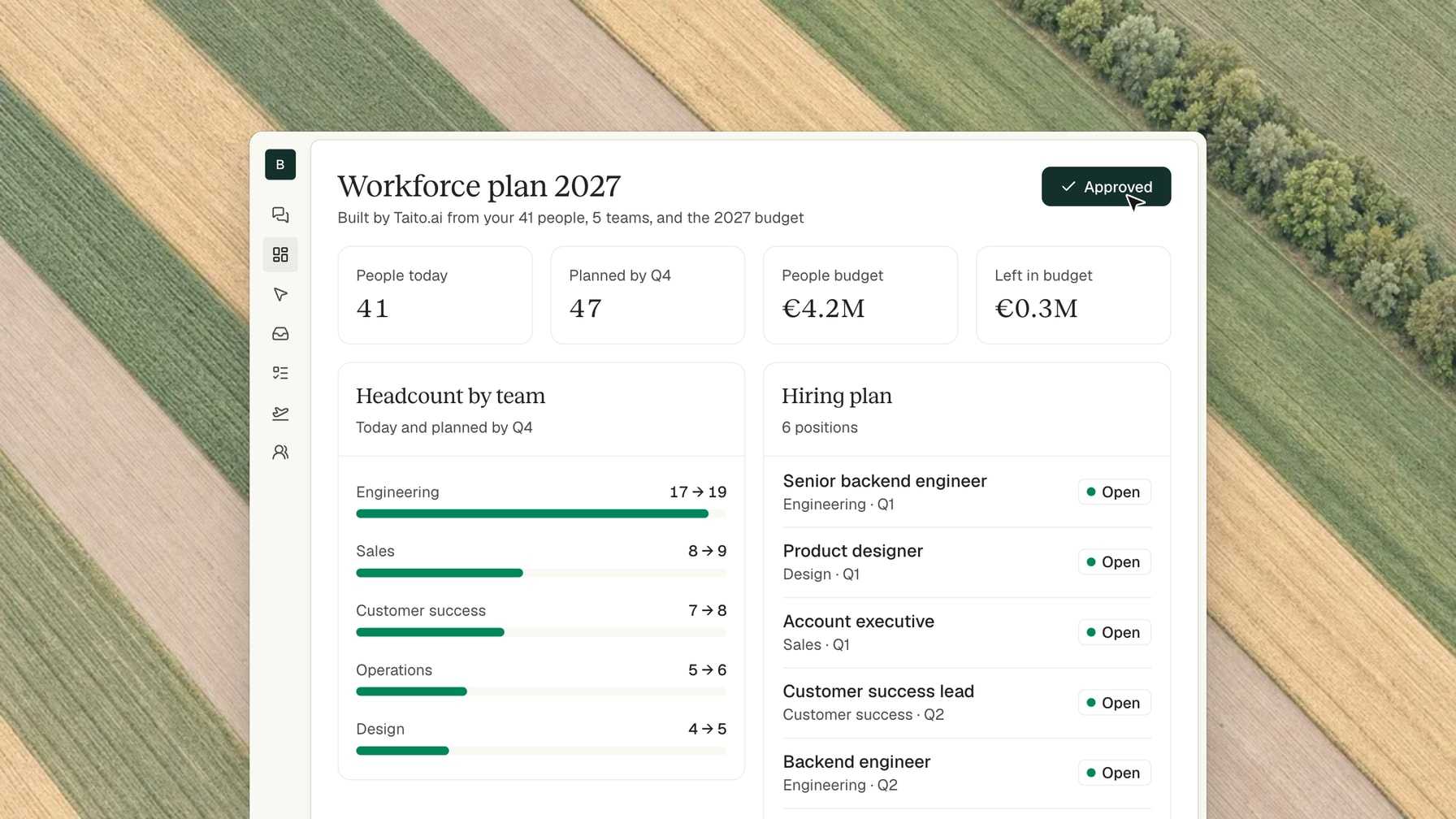
A canvas is a report or small tool that Taito.ai, the agentic HRIS, builds inside your HRIS. Examples are next year’s workforce plan or a board of onboarding tasks for this month’s new hires. Taito.ai now comes with ready-made canvases for common people reports, and builds new ones from a plain-language description.
The monthly report nobody wants to build
People reporting at a growing company usually starts with an export. Someone pulls data from the HRIS into a spreadsheet, cleans it, builds the charts, and does the same again next month. If the owners or the board want a fixed format, that work repeats exactly. When nobody has time to pull the report, problems stay hidden. People quit in their first year, engagement drops in one team, or one team works far more hours than the rest.
A separate dashboard tool can help, but it needs its own data connection and its own access rules. Someone has to keep both in line with the HRIS.
With canvases, the report lives in the HRIS. It reads the same live data and the same permissions as the rest of Taito.ai, so nobody exports, rebuilds, or re-checks access.
Start from a ready-made canvas
Taito.ai comes with canvases for common people reports: My team dashboard, Workforce planning, Tenure and attrition, and Over-time engagement. You open one and it shows your company’s data right away, and you can change it to fit how your company works. Ready-made or built from a description, canvases cover work like this.
Workforce planning
Plan next year’s headcount against the people budget. A workforce planning canvas shows today’s headcount by team, the new positions you plan to open, and the backfills for people who leave. Each one shows what it costs. You see how the budget is allocated across teams before anyone approves the plan.
Engagement and performance over time
See how engagement and performance change across your organization. A canvas can show each engagement survey round and each performance review cycle side by side, by team. A drop then shows up as a trend across rounds, with the teams it affects.
Pay equality and transparency
Analyze pay across your whole organization. A pay equality canvas compares pay for the same role and level across teams, locations, and genders, and shows where the gaps are. With the gaps in one place, it is easier to explain how pay is set. Pay is sensitive data, so the canvas follows each viewer’s permissions: only the people allowed to see pay see it.
Performance calibration
In calibration, managers compare performance ratings across teams so that everyone is rated by the same standard. A calibration canvas shows the ratings from a review cycle side by side, so managers and HR can compare them together in the session. The people in the session decide on any changes. Afterward, someone from the session applies the agreed changes from the canvas, and Taito.ai asks them to confirm each one before it saves it.
Tools for your people team
Build small tools around how your people team works. For example, a kanban board of onboarding tasks for this month’s new hires, or a status tracker for contracts, probation periods, and reviews.
A review or survey report you have customized can be saved as a canvas and used again for the next cycle.
Describe anything else
When no ready-made canvas fits, describe what you need to Taito.ai’s assistant in the web app. For example: “a pay equality report by role and level”, or “a calibration view for this review cycle”. The assistant builds the canvas from your description, and you can keep asking for changes until it is right.
A canvas can do more than show data. It can include actions, such as approving a request. Before an action that changes or removes data, Taito.ai asks you to confirm it. Tables in a canvas can be exported, for the cases where the numbers still need to go into another file.
Shared safely across your organization
A canvas is only safe to share if it never shows someone data they shouldn’t see. Every canvas checks each viewer’s own permissions when it loads:
- One canvas, different views. A manager sees their own team. HR sees the whole company.
- You choose who builds. A permission controls who can create canvases. Everyone can view the canvases shared with them.
- Ownership moves with the work. When someone changes role or leaves, you can transfer their canvases to another person.
Canvas best practices
A canvas is quick to build. These habits make it one that people come back to:
- Answer one question per canvas. “Is attrition rising, and in which teams?” is a canvas. “Everything about our people” is a data dump.
- Use your company’s own terms. If your company counts backfills separately from new positions, the canvas should too. A wrong label makes people distrust the numbers.
- Show the trend, not only this month. One number rarely tells you whether something is getting better or worse.
- Share sensitive canvases narrowly. Each viewer sees only what their permissions allow, but pay and health data still belong with fewer people than headcount does. Share those canvases only with the people who need them.
- Keep decisions about people with people. A canvas can show the data behind a pay or rating decision. It can also apply a change once it is agreed, but the decision belongs to people.
- Save what you rebuild. If you make the same report every cycle, save it as a canvas, so the next round starts from it.
Canvases are available on every Taito.ai account today, with no add-on. Read more on the Canvases page.
Other updates
Fixes
- A time off policy can no longer be archived while people are still assigned to it
- Performance review messages keep their formatting when they appear in tasks
Improvements
- Custom profile fields can hold rich text
- The time off calendar colors each request by its type, and a new request’s summary lists the person’s existing requests